Winna mobile casino Rwanda — browser guide for Android and iPhone
Most people in Rwanda open a casino on their phone first — not a laptop. Winna runs in the mobile browser, which means no app store download, but also no excuse to grab a random APK from a Telegram chat.
This page is about what to check before you deposit: does login hold, do games load on your data plan, does the cashier make sense on a small screen? Five minutes of testing beats an hour of support tickets later.
Mobile play works when you use the official site in an updated browser, run a quick test before real money, and treat any unsolicited app link as hostile. A lobby that feels fast on home Wi-Fi can still choke on 4G — test on the connection you'll actually use.
- Default path: official Winna site in Chrome (Android) or Safari (iPhone).
- Before a long session: login, one slot, one live table, cashier, logout.
- Bookmark the real URL — don't follow ads or DMs to unknown domains.
- No verified APK from third-party download pages.
- Short, budgeted sessions beat endless scroll on a small screen.
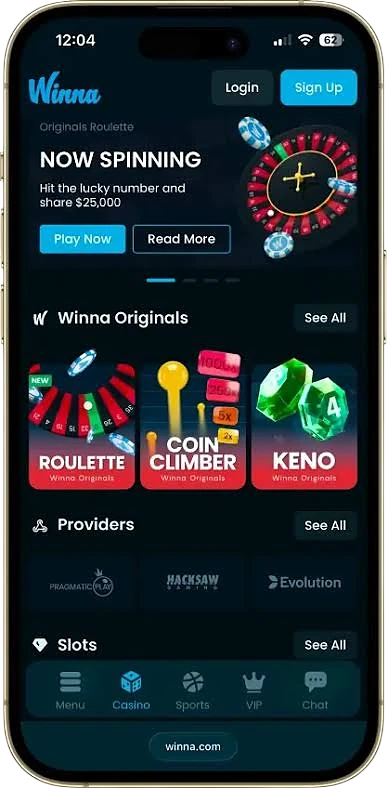
What to check before you play
Run through these once on your phone. They're boring, but each row is something support will ask about if something breaks.
| Check | What good looks like | Warning sign | Action |
|---|---|---|---|
| Site access | Loads quickly over HTTPS, correct domain | Certificate warning or odd spelling in the URL | Close the tab and open from your bookmark |
| Login flow | Sign-in sticks without looping back | Endless redirect back to login | Clear cookies once and try again |
| Game launch | Slot opens within 10–15 seconds | Spinning loader that never finishes | Switch network and relaunch |
| Cashier | Coins, networks, and limits are visible | Blank screen or missing method details | Ask support before sending crypto |
| Account safety | Strong password, 2FA if available | Login alert from a device you don't recognise | Change password and review active sessions |
Browser, not a mystery APK
Winna is built for the mobile browser — same lobby, same cashier, same account as desktop. That's the path support can actually help you with if something goes wrong.
You'll still see sites claiming to offer a Winna app or a faster mirror. Unless that link comes from the official domain or verified support, ignore it. Modified APKs are how accounts get compromised, not how you get smoother spins.
Five-minute test — do this before you deposit
Boring advice that works: don't fund the account until you've walked through the basics on your actual phone and connection.
- Open Winna from a bookmark — not a search ad or forwarded link.
- Log in and check that your profile and balance load correctly.
- Launch one slot and spin for a minute — note lag or freezes.
- Open one live table for a minute — watch stream quality in portrait and landscape.
- Open deposit and withdrawal screens; read limits and networks without sending anything.
- Log out and back in — if the session drops instantly, fix that before real money.
Android — quick setup
Most Rwanda Android users are on Chrome. A few settings trip up more people than the casino itself.
- Use updated Chrome or Samsung Internet.
- Keep JavaScript on and allow first-party cookies.
- Turn off battery saver during live dealer sessions — it kills background streams.
- Leave at least 1 GB free storage so cache and game assets don't choke.
- Custom DNS is fine only if you know what you're doing; wrong settings look like "site down."
- Never sideload a gambling APK from a link someone sent you.
iPhone — quick setup
Safari is the default and usually enough. The friction tends to be blockers and permissions, not the phone itself.
- Run current iOS and Safari.
- If login or cashier breaks, try disabling content blockers for the site.
- Allow pop-ups only when the payment flow needs a verification window.
- Use Face ID and a device passcode — phones get borrowed and stolen.
- Stable 4G/5G or Wi-Fi beats a weak signal with high bars.
- Clear website data if pages stop updating after a site change.
Cashier and crypto on mobile
Depositing from a phone adds one extra risk: small screens make wallet addresses easy to misread. Open the cashier on mobile before you copy anything — what's available can differ from what you saw on desktop.
- Check minimum and maximum limits before you send.
- Confirm coin and network — USDT on Tron is not USDT on Ethereum.
- Copy the address from the cashier, not from an old chat message.
- Wait for the normal confirmation window before opening a support ticket.
More detail on networks, KYC, and withdrawal delays is on our payments page.
Live casino on a small screen
Live tables can run well on mobile when the connection is steady, not just fast. Landscape mode gives you readable cards and buttons; portrait is fine for slots, awkward for roulette.
- Stability matters more than peak speed — packet loss stutters video.
- Close background downloads and streaming apps during live play.
- Drop stream quality first if controls lag; don't tap bets into a frozen round.
- If the video desyncs from the betting timer, pause until it catches up.
When something breaks
Most mobile issues are network, cache, or blocker related — fixable in a few minutes. If the same problem survives a network switch and a cache clear, it's time for support with specifics.
| Problem | Likely cause | Quick fix | When to contact support |
|---|---|---|---|
| Login fails repeatedly | Stale cookies or wrong password | Reset password, clear browser data once | Still fails after a confirmed reset |
| Game won't load | Weak signal or blocked scripts | Change network, disable aggressive blockers | Multiple games fail for 15+ minutes |
| Deposit still pending | Blockchain confirmations in progress | Wait the normal window, check TXID in your wallet | Balance unchanged past the stated timeframe |
| Live video stutters | Packet loss or apps eating bandwidth | Close background apps, lower stream quality | Still bad on stable home Wi-Fi |
| Logged out for no reason | Session timeout or second device signed in | Sign in on one device only | Keeps happening without explanation |
Keeping your account safe on mobile
Phones travel with you — that's the point and the risk. Treat your Winna login like banking, not like a social app you stay signed into forever.
- Password unique to Winna — not reused from email or WhatsApp.
- Enable two-factor authentication if the account offers it.
- Lock the device; use biometrics so a found phone isn't an open casino.
- Don't stay logged in on a phone you share or lend.
- Glance at URL before every login — phishing pages mimic layout, not domain spelling.
- Ignore "support" DMs with payment links or password requests.
Mobile play and responsible gambling
The phone in your pocket makes it easy to play for "just five more minutes" that turn into an hour. Decide your budget before the first spin, set a 30–45 minute timer, and log out when it rings — not after a bad run when chasing is one tap away.
If play stops feeling like fun, step away from the screen and use deposit limits or self-exclusion rather than topping up from frustration.
Worth knowing upfront
On the plus side
No app install — open the browser and you're in. Deposits, withdrawals, and account checks work on the go. On a decent connection, slots and live tables are genuinely playable from a phone. And browser play means you're not trusting a random APK with your login.
Watch out for
Performance lives and dies on your network — 4G in a weak coverage area is a different experience from home Wi-Fi. Small screens slow table decisions. Public Wi-Fi and shared devices are bad places to log in. And easy access makes it easier to play longer than you meant to.
Bottom line
For most users in Rwanda, Winna on mobile means the official browser site — tested for five minutes on the connection you'll actually use, with APK links left alone.
If login, games, and cashier all pass that test, short controlled sessions on your phone are practical. If something important fails, fix it before you deposit — that's cheaper than learning on a real-money transfer. Stuck on a technical issue? Our support page has message templates that get faster answers than a vague "it's not working."
FAQ
Is there an official Winna mobile app for Rwanda?
Not that we've seen verified. Winna is browser-first — open the official site in Chrome or Safari. If someone sends you an APK or mirror link, treat it as a scam until support confirms otherwise on the real domain.
Can I play directly in a browser without installing anything?
Yes, that's the normal route. Sign in through an updated mobile browser and you get the same lobby, cashier, and games without an app store download. Keep your browser current — old versions are where login scripts start breaking.
Which browser works best on Android?
Recent Chrome is usually the smoothest bet. Samsung Internet and Firefox work too if JavaScript and cookies are enabled. If the cashier looks blank, check those settings before blaming the casino.
Which browser works best on iPhone?
Safari — it's what most iPhone users run anyway. Keep iOS updated and allow the site permissions it asks for during login or payments. Aggressive content blockers can silently break the cashier.
How do I test mobile performance in five minutes?
Log in, open one slot and one live table, peek at deposit and withdrawal screens without sending anything, then log out and back in. If all of that feels stable on your usual connection, you're in better shape than most people who deposit first and troubleshoot later.
Does mobile cashier support crypto in Rwanda?
Winna is crypto-focused, but what's visible in your cashier can change by account and period. Open it on your phone before you send anything — note the coin, network, minimum, and how many confirmations the site expects.
What should I do if a game freezes on mobile?
Switch between Wi-Fi and mobile data, refresh once, and reopen the game. If it keeps happening, note the time and game name, clear browser cache, and contact support with those details — not just "it doesn't work."
How can I make mobile play safer?
Unique password, 2FA if offered, device lock with biometrics, and no gambling APKs from random sites. Public Wi-Fi is fine for browsing; it's a bad place to log in or open the cashier.
How do I stay in control while playing on phone?
Set a budget and a session timer before you open a game — the phone makes it easy to play longer than you planned. Take breaks after losses, and use deposit limits or self-exclusion if the session stops feeling like fun.